
CustomShortcuts 2.0 is out, and it’s still free. Everything it did before, it still does. No ads, no account, no trial that runs out.
What’s new is a way to take your shortcuts with you. You can now export your keyboard shortcuts to a file, for free. And to bring them back, on the same Mac or on another one, there is PlusPack, a small one-time purchase.
Change keyboard shortcuts on your Mac, for free
If you haven’t used CustomShortcuts before, here’s what it does. Most Mac apps let you trigger menu commands from the keyboard, but you don’t get to pick the keys. Some commands you use all day have no shortcut at all. Others have one that’s awkward to type, or that clashes with a shortcut from another app you rely on.
macOS has a way to fix this, tucked away in System Settings under Keyboard > Keyboard Shortcuts… > App Shortcuts. It works, but you have to type the menu item’s title exactly as it appears in the menu, ellipsis and all. Get one character wrong and nothing happens. And there’s no good overview of the shortcuts you’ve already set.
CustomShortcuts uses the same system mechanism, so your shortcuts behave just like the ones you’d set up in System Settings. The difference is that it reads the app’s menus and suggests the menu item titles for you. Pick the app, pick the command, press the keys you want. You can set shortcuts for a single app or for all apps at once, and see, edit and remove them all in one place.
That’s been free since CustomShortcuts 1.0 came out in 2020, and it stays free in 2.0.

Our most requested feature
Ever since that first release, one question has come up more than any other: “How do I move my shortcuts to my other Mac?”
Fair question. Custom shortcuts turn into muscle memory within days. Sit down at a Mac that doesn’t have them and your fingers keep pressing keys that do nothing. Until now, the only answer was to set them all up again by hand.
CustomShortcuts 2.0 answers it in two parts.
Back up your shortcuts, for free
Choose File > Export Shortcuts… to save your custom shortcuts to a file. Export all of them, or only the ones for the apps you select. Keep the file with your other backups, or on your cloud drive.
Export is free for everyone. It’s your data, and you should always be able to get it out.
PlusPack: bring your shortcuts to another Mac
PlusPack adds File > Import Shortcuts…. With it you can:
- Set up a new Mac and have all your shortcuts on day one.
- Keep your desktop and laptop alike. Set up your shortcuts once, then bring the file over to the other Mac.
- Restore from a backup after a clean install of macOS.
Import is careful with what you already have. You choose which apps to import, and the shortcuts are merged with your current ones. If a shortcut in the file conflicts with one you already set, CustomShortcuts shows you the conflict before anything is replaced. Shortcuts for apps that aren’t installed on that Mac are set aside. CustomShortcuts can also remove shortcuts that aren’t in the file, but only if you tell it to.
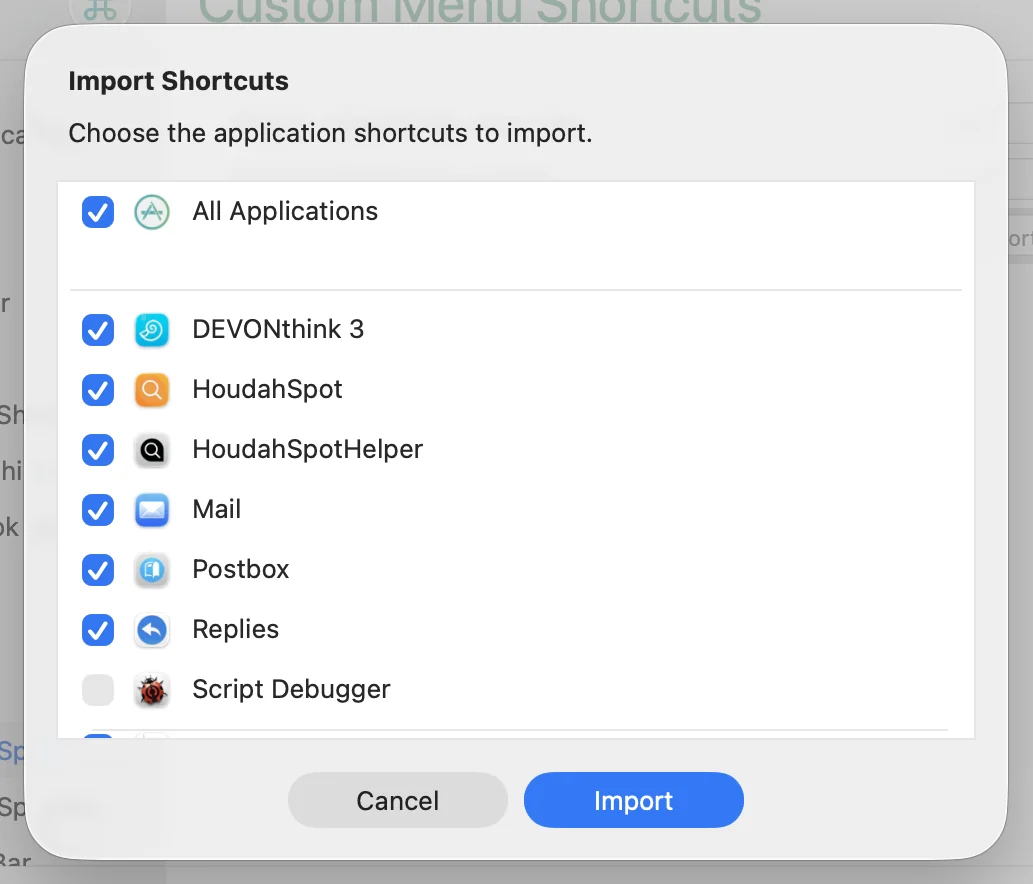
You move the file yourself, by AirDrop, iCloud Drive or a USB stick, whenever you choose. CustomShortcuts doesn’t sync anything in the background. And since export is free, you only need PlusPack on the Mac you import to.
PlusPack is a one-time purchase of $8 for one person, on all the Macs they use. It covers all CustomShortcuts 2.x releases. There is no subscription, and our 15-day money-back guarantee applies if it doesn’t do what you hoped.
Why charge for anything?
CustomShortcuts has been free for more than six years, and we intend to keep it that way. PlusPack lets those of you who get the most out of CustomShortcuts chip in a little, without taking away anything anyone already had.
Get CustomShortcuts 2.0
CustomShortcuts is a free download from our web site. Download CustomShortcuts 2.0.