In Tembo, you can select which folder or volume to search by clicking its name in the main sidebar. Continue reading Search Across Multiple Folders in Tembo
Author: houdah

Find Images With No GPS Coordinates
In a previous post, we searched for files with no Spotlight comment or tags. Today, we are looking for photos with no GPS latitude or longitude information.
The technique we used last time works for any metadata attribute containing text. For example: subject, author, album, etc. It does not work for number or date values. HoudahSpot won’t let us use the “*” wildcard character in the criteria editor. It expects us to enter a number or a date.
Since latitude and longitude are both numbers, we need to use a slightly different technique. We will make us of some of the more advanced features of the HoudahSpot search field. This is located in the toolbar of the search window.
Create Lists of Files. Export Metadata to CSV
Use HoudahSpot to create lists of files. For example, you could create a list of …
- Photos shot this year. List file name, resolution & path
- Video files larger than 100 MB. List duration, codec & file size
- Audio files located outside your iTunes media folder
- Old files. List date created and date last modified
- …
HoudahSpot can save search results to CSV files. These files can, for example, be imported in Apple Numbers, Microsoft Excel spreadsheets etc. Note that HoudahSpot uses the tab character as separtor beween columns.
Continue reading Create Lists of Files. Export Metadata to CSV

See the Total Size of a Folder
The HoudahSpot File Info window shows information about the currently selected search result. For folders, this includes the total size of all items contained within.
It is quite easy to use HoudahSpot to inspect other files or folders. Simply drag a file or a folder from Finder, from HoudahSpot, or any other application onto the File Info window.
You can use this technique to see the total size of a parent folder of a file you have found using HoudahSpot. Continue reading See the Total Size of a Folder
Find Large Files in OS X
Is Macintosh HD full to the brim? Wonder what is using up all that space? With HoudahSpot, it is easy to find the culprits: large files that were recently added to your Mac. If disk space is running tight, you may want to delete or compress these files, or move them to an external disk. Continue reading Find Large Files in OS X
Start a file search from LaunchBar
LaunchBar is a popular application launcher, clipboard manager, and much more.
HoudahSpot is a powerful file search tool. It takes the guesswork out of Spotlight searches and helps you find file hidden deep in the “haystack” of files accumulated over the years.
The “Search with HoudahSpot” LaunchBar action provides an elegant way to start a HoudahSpot search using LaunchBar.

Start a Tembo file search from Alfred, Butler, or LaunchBar
Tembo implements a custom URL scheme. Use this to start searches from third party tools like Alfred, Butler, or LaunchBar.
Tembo 2.0 search URLs have the following format:
tembo2://search?query=[QUERY]&location=[LOCATION]&group=[GROUP]
Such URLs can be invoked by any application, browser, launcher, script, etc. In this article we will look at setting up a custom search in Alfred.
Continue reading Start a Tembo file search from Alfred, Butler, or LaunchBar
Find files with no tags or Spotlight comment
When organizing files, we sometimes need to find files that lack a Spotlight comment or have not yet been tagged. Finding such files is easy with HoudahSpot. The procedure however is not immediately obvious. This post will show you how to search for files with no tags.
Continue reading Find files with no tags or Spotlight comment
Search for files with PopClip & HoudahSpot
PopClip is a popular Mac utility by Pilot Moon software. PopClip appears when you select text with your mouse on your Mac. Choose from a large collection of extensions to perform actions on or with the selected text.
The HoudahSpot PopClip extension searches for files related to the selected text. Continue reading Search for files with PopClip & HoudahSpot
Narrow down searches using the Info pane
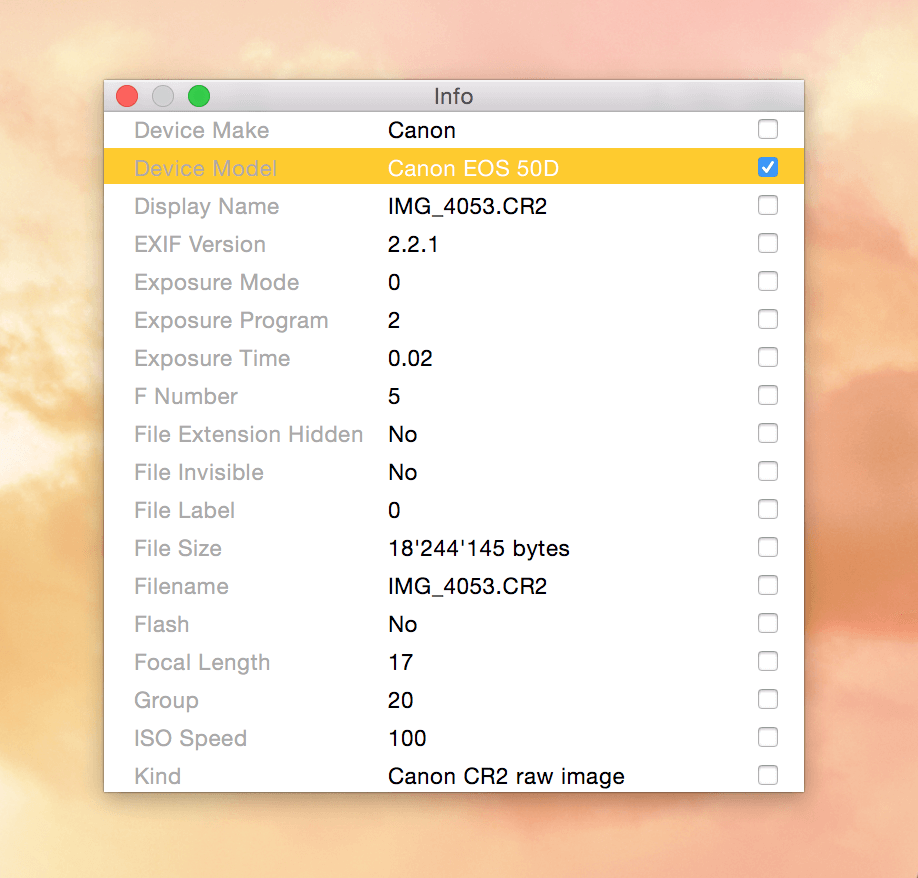
The HoudahSpot Info pane shows all metadata Spotlight has recorded about a particular file. This includes generic attributes (file name, dates, etc.) as well as custom attributes filled in by the Spotlight importer responsible for indexing the file. You can use any of these attributes to find similar files.