Geotags — location information — are an integral part of your photo: just like the image shows what you saw, the timestamp tells you when you captured the memory, and the geotag reveals where you found a location worth capturing.
When exporting, reusing, or sharing photos, you want that location information to tag along
If you drag photos out of Apple Photos and the location data is missing, there’s a single setting behind it.
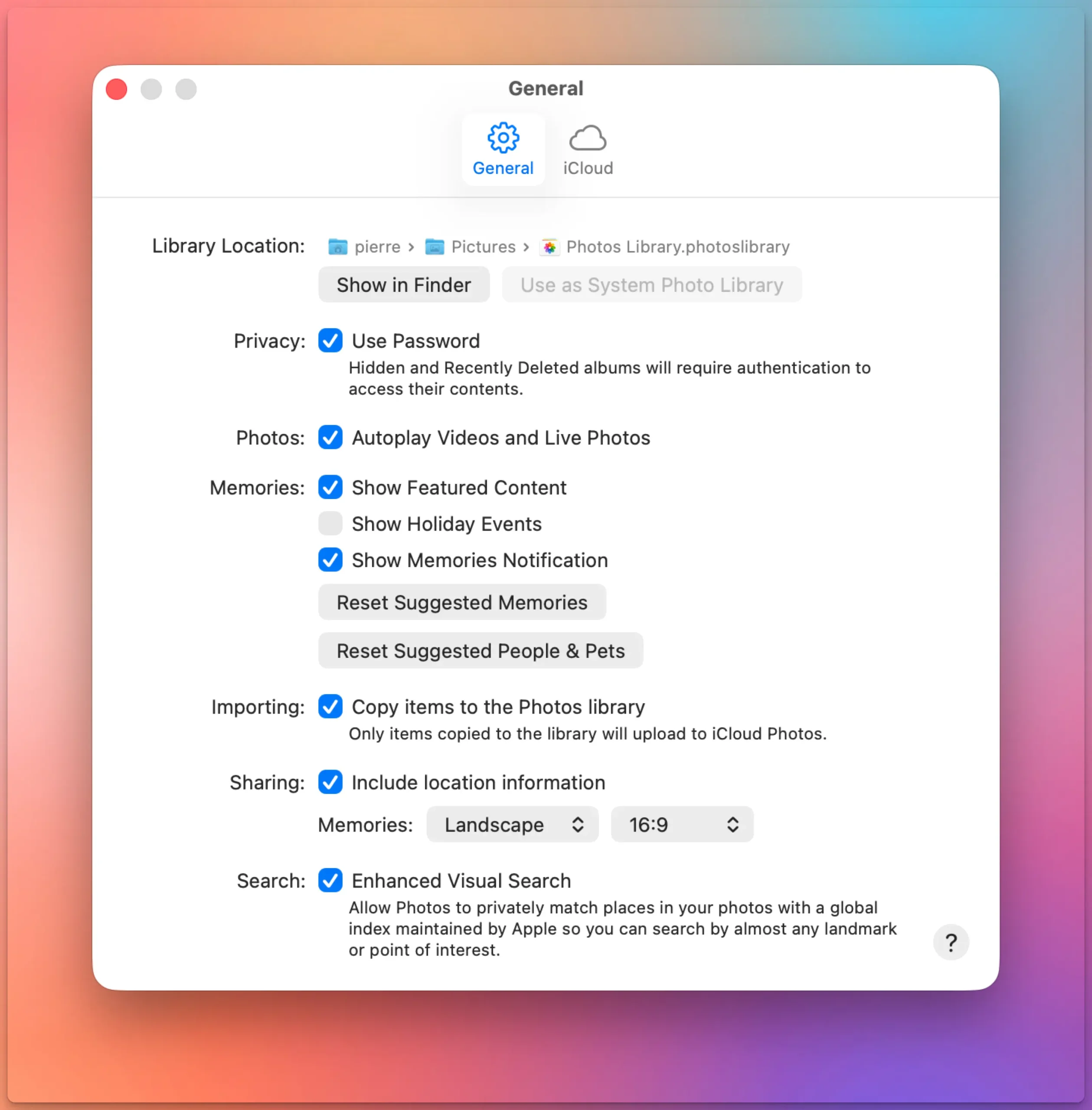
Go to Photos > Settings > General, then look under Sharing for “Include location information.” It’s on by default, but if it’s off, your exported files lose their GPS coordinates.
Photos Workbench 1.7 is out today with a new feature and two new languages: German and French.
The main addition is practical: you can now drag albums between folders directly inside Photos Workbench, letting you reorganize the structure of your Apple Photos library without workarounds. The update also adds full French and German localizations, making Photos Workbench available to a broader audience.
Rearrange albums in Apple Photos
Photos Workbench has always been able to work with the albums you created in Apple Photos to organize your library. Up until today, when you wanted to rearrange your albums, you had to leave Photos Workbench and return to Apple Photos to complete the task. No longer.
Photos Workbench 1.7 adds drag-and-drop album rearranging. You can grab an album and drop it into a different folder. That’s all there is to it.
Your iPhone geotags every photo automatically. Your DSLR or mirrorless camera almost certainly does not. Sometimes your best photos and most precious memories lack geotags.
That gap — between smartphone shots that know where they were taken and camera shots that don’t — is the whole reason geotagging software exists.
If all your photos come from a phone, you probably don’t need this article. But if you shoot with a dedicated camera, or if you care whether your location data survives a switch from one app to another, read on.
Know where you took that photo
By adding geotags to your photos, you basically “pin” them to the places they were taken. Geotags create a permanent record of where a photo was taken.
They allow photo cataloging tools like Apple Photos and Adobe Lightroom to organize photos by location.
Geotags add to the “story” of a photo. A photo pinned to a map – at the exact spot where it was taken – has context. A series of tagged photos documents the path taken. There are several options to share your photos with their geoinformation. Google Photos and Flickr for example can show their location an map. With Google My Maps or Google Earth, you can display a series of photos pinned to their locations.
Google Photos: a photo and its metadata, including a map
Find that photo
Years from now, you may not remember when you took the photo you are looking for. But you will remember roughly where you took it.
Sometimes, you need to find a good picture of a specific spot. For example, you want to illustrate a blog post on the Golden Gate Bridge. Over the past years, you’ve visited the site several times and took a lot of different pictures. In this case, searching by date will prove arduous. Consulting a map with all your images represented by pins is a lot more efficient.
Map View in iPhoto: Pins represent pictures taken at these locations
You switched to a Mac. Good. But now your geotagging workflow is broken — GeoSetter is Windows-only, and it always has been.
If you spent years building that habit — recording a GPX track on a hike, syncing it with your camera photos back at home, watching coordinates land in your EXIF data — you know how satisfying it is. You don’t want to give that up. You just need it to work on macOS.
HoudahGeo is the closest thing to a Mac equivalent. It covers the same core workflow: load your photos, import a GPS track log, let the software match timestamps and assign coordinates. It also supports manual geotagging by dropping photos onto a map, reverse geocoding to fill in city and country names, and writing everything to EXIF, XMP, and IPTC tags without recompressing your images.
HoudahGeo’s reverse geocoding goes beyond what GeoSetter offered: you can choose from five different services, including a fully offline option and a new BigDataCloud integration, depending on what your workflow needs. See how they compare.
We’re happy to announce Photos Workbench 1.6, a performance-focused update that makes organizing and curating your photo library faster and more reliable.
If you use Photos Workbench alongside Apple Photos, this update improves the everyday workflows that matter most: browsing large libraries, comparing similar shots, and quickly identifying your best photos.
This release also follows closely on the heels of another major update: HoudahGeo 7.1, which introduced viewing direction and map improvements. Together, these updates continue our mission of making photo management on the Mac faster, clearer, and more enjoyable.
Compare photos, cull, and curate your Apple Photos library
We are pleased to announce the release of HoudahGeo 7.1, a focused update that delivers one of the most requested features: visualization of viewing direction on the built-in map.
This release also:
improves map behavior with an off-screen target indicator
adds location coordinates copy & paste support from Apple Photos
introduces a French localization
and significantly reduces memory usage for photo previews.
HoudahGeo 7.1 – viewing direction visualized on built-in map
Todd Oltoff over at ScreenCastsOnline just published a full walkthrough of HoudahGeo 7, and it’s one of the more thorough tutorials we’ve seen of the app.
ScreenCastsOnline has been around for over 17 years and has built a solid reputation as a go-to resource for Apple software tutorials.
Their video goes through the entire HoudahGeo workflow from start to finish — loading photos from a camera or SD card, syncing a GPX track log to place images on a map, reverse geocoding coordinates into actual place names, and writing everything back to your files (or XMP sidecars, if you prefer).
HoudahGeo and Photos Workbench share a smart little feature that often goes unnoticed—until it magically saves you dozens of clicks and a lot of time.
If you manage large collections of geotagged photos, you know that adding titles, descriptions, and keywords can quickly become a tedious chore: Click on a photo. Click on the field. Type. Click the next photo. Click the field again… repeat hundreds of times.
But what if you could cut that process in half—and dramatically speed up your workflow?
HoudahGeo’s streamlined quick editing feature transforms this repetitive task into a smooth, efficient process that could save you hours of work.
Streamlined quick title editing with consistent naming
We’re thrilled to announce the launch of HoudahGeo 7.0 — the biggest update ever to our flagship geotagging solution for Mac.
Since its debut in 2007, HoudahGeo has helped photographers and travelers document their journeys by adding precise GPS location data to their photos. With version 7.0, HoudahGeo steps into a new era: it’s now also your go-to tool for video geotagging.
Whether you’re a photographer, filmmaker, or digital storyteller, HoudahGeo 7.0 gives you powerful tools to build a location-aware media library that goes beyond still images.
🎥 Geotag Videos Alongside Photos
This is the #1 feature request we’ve received — and it’s finally here: video geotagging.
You can now tag your travel videos with GPS coordinates just as easily as photos. Whether you’re working with drone footage, action cams, or smartphone videos, HoudahGeo 7.0 helps you enrich your entire collection with meaningful location data.
Photos Workbench seamlessly integrates with Apple Photos to help you organize, name, and compare your photos.
The Importance of Star Ratings
Star ratings are a powerful tool for organizing and culling your photos and videos. They help you identify your best images and categorize them by quality or relevance.
With Photos Workbench, you can assign star ratings to your photos and videos, ranging from 1 to 5 stars. While the interpretation of each rating is personal, here’s a suggested guide:
No star – Unrated. Still needs reviewing
★ (1 Star) – Rejected. Marked for deletion
★★ (2 Stars) – Keep without adjustments. May have emotional value
★★★ (3 stars) – Okay. Worth investing time into adjustments
★★★★ (4 stars) – Good. Worth sharing
★★★★★ (5 Stars) – Fantastic. Worth printing
For tips on developing a workflow for star ratings, check out our previous blog post.
How to Assign Star Ratings
No matter how you choose to interpret star ratings or structure your workflow, Photos Workbench offers several efficient ways to assign ratings to your photos and videos.
To provide the best experiences, we use technologies like cookies to store and/or access device information. Consenting to these technologies will allow us to process data such as browsing behavior or unique IDs on this site. Not consenting or withdrawing consent, may adversely affect certain features and functions.
Functional
Always active
The technical storage or access is strictly necessary for the legitimate purpose of enabling the use of a specific service explicitly requested by the subscriber or user, or for the sole purpose of carrying out the transmission of a communication over an electronic communications network.
Preferences
The technical storage or access is necessary for the legitimate purpose of storing preferences that are not requested by the subscriber or user.
Statistics
The technical storage or access that is used exclusively for statistical purposes.The technical storage or access that is used exclusively for anonymous statistical purposes. Without a subpoena, voluntary compliance on the part of your Internet Service Provider, or additional records from a third party, information stored or retrieved for this purpose alone cannot usually be used to identify you.
Marketing
The technical storage or access is required to create user profiles to send advertising, or to track the user on a website or across several websites for similar marketing purposes.