Is Macintosh HD full to the brim? Wonder what is using up all that space? With HoudahSpot, it is easy to find the culprits: large files that were recently added to your Mac. If disk space is running tight, you may want to delete or compress these files, or move them to an external disk. Continue reading Find Large Files in OS X
Tag: Search
Start a file search from LaunchBar
LaunchBar is a popular application launcher, clipboard manager, and much more.
HoudahSpot is a powerful file search tool. It takes the guesswork out of Spotlight searches and helps you find file hidden deep in the “haystack” of files accumulated over the years.
The “Search with HoudahSpot” LaunchBar action provides an elegant way to start a HoudahSpot search using LaunchBar.

Run Case Sensitive Searches
Searching files with HoudahSpot is always case insensitive. This means that a search for “house”, a search for “House” or a search for “HOUSE” will return the same results. HoudahSpot does not distinguish between upper and lower case letters.
If you need to run a search that respects the case, you can do this using the mdfind command in the Terminal app. HoudahSpot will help you with the Spotlight query syntax. Continue reading Run Case Sensitive Searches
Start a Tembo file search from Alfred, Butler, or LaunchBar
Tembo implements a custom URL scheme. Use this to start searches from third party tools like Alfred, Butler, or LaunchBar.
Tembo 2.0 search URLs have the following format:
tembo2://search?query=[QUERY]&location=[LOCATION]&group=[GROUP]
Such URLs can be invoked by any application, browser, launcher, script, etc. In this article we will look at setting up a custom search in Alfred.
Continue reading Start a Tembo file search from Alfred, Butler, or LaunchBar
Use the Mail template to find e-mails in Apple Mail
According to research, e-mail users send and receive an average of 122 business e-mails per day. And the amount is bound to increase in the future. To find specific information in the haystack of archived e-mail data can be a difficult task.
Continue reading Use the Mail template to find e-mails in Apple Mail
Put frequently used Search Templates into the Dock for quick access
Here is a quick and easy way to access your favorite and frequently used HoudahSpot search setups: Just put them into the Dock, from where you can access them with one click.
Continue reading Put frequently used Search Templates into the Dock for quick access
Find files with no tags or Spotlight comment
When organizing files, we sometimes need to find files that lack a Spotlight comment or have not yet been tagged. Finding such files is easy with HoudahSpot. The procedure however is not immediately obvious. This post will show you how to search for files with no tags.
Continue reading Find files with no tags or Spotlight comment
Search for files with PopClip & HoudahSpot
PopClip is a popular Mac utility by Pilot Moon software. PopClip appears when you select text with your mouse on your Mac. Choose from a large collection of extensions to perform actions on or with the selected text.
The HoudahSpot PopClip extension searches for files related to the selected text. Continue reading Search for files with PopClip & HoudahSpot
Narrow down searches using the Info pane
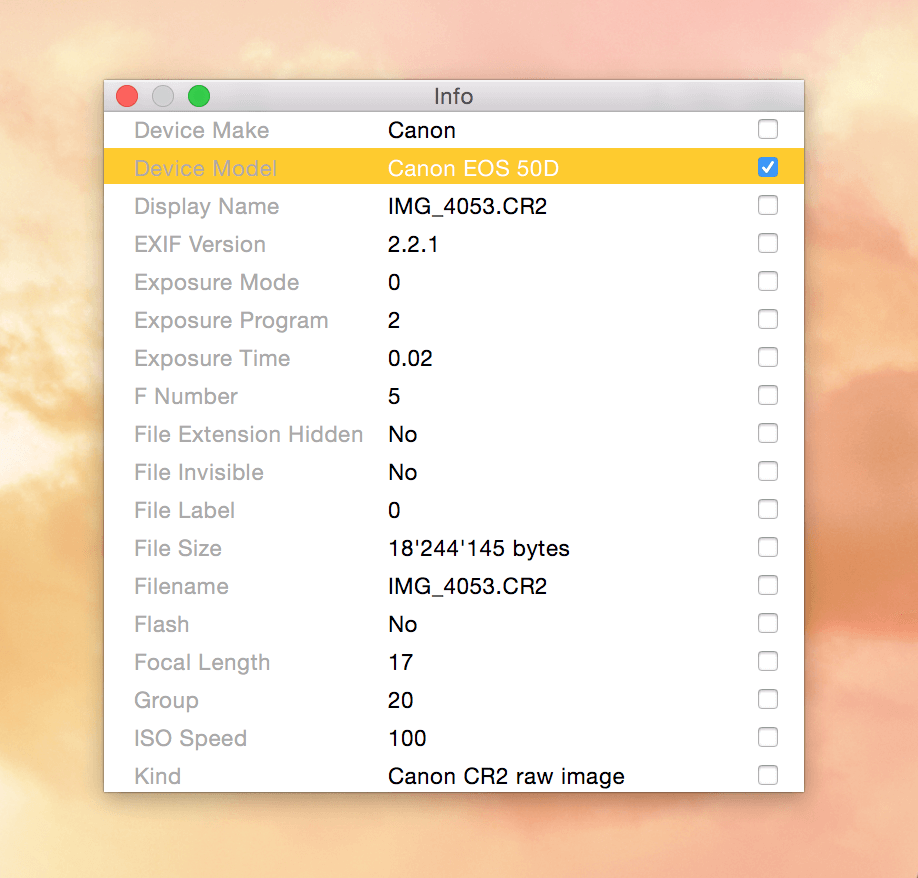
The HoudahSpot Info pane shows all metadata Spotlight has recorded about a particular file. This includes generic attributes (file name, dates, etc.) as well as custom attributes filled in by the Spotlight importer responsible for indexing the file. You can use any of these attributes to find similar files.

Find and organize video files using HoudahSpot
With HoudahSpot, it is easy to search your hard drive for media files. Just set the Content Kind criterion to Audio, Image, or Video – and HoudahSpot will look for files of the type specified.
If you’ve ever been looking for a specific photograph, you may have already used the pre-installed sample template named “My Photos”. It lists criteria that come in handy when searching images, like pixel count.
When searching for specific video files, other criteria come into play, e.g. duration, video codec or bit rates. We have prepared a template for HoudahSpot 4 that helps you sort through your moving images: the Video template is available for download here. It is pre-configured with a set of criteria and results columns that relate to video files. Continue reading Find and organize video files using HoudahSpot