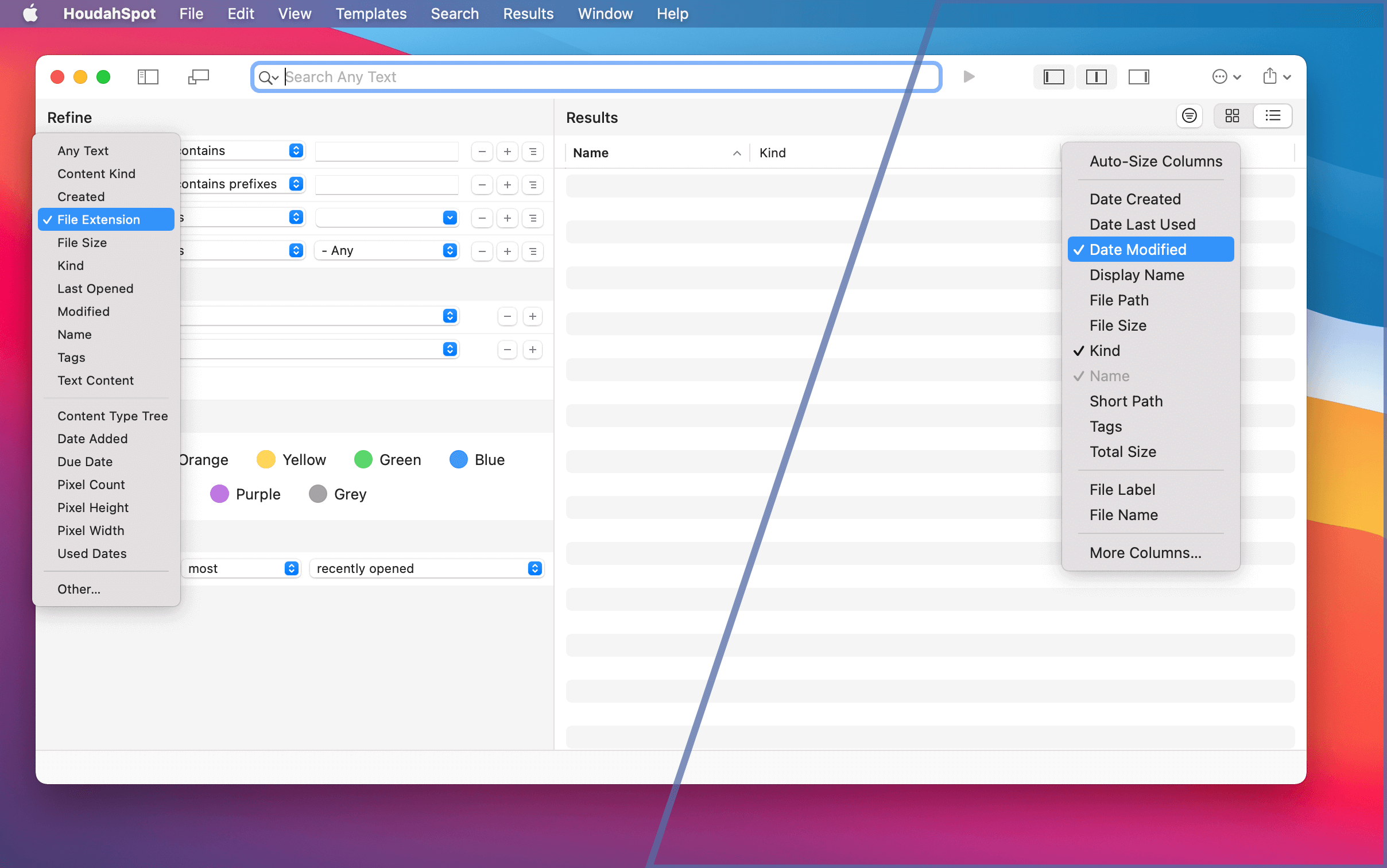
Finding files on your Mac can be a difficult and sometimes a frustrating task because of their sheer number — we all have so many!
HoudahSpot is an application that allows you to do refined searches to get just the files you are looking for and includes several useful presets right out of the box.
In HoudahSpot, you can choose between hundreds of criteria to search for files. HoudahSpot also lets you specify in which folders to search and how to sort results.
There are lots of options to choose from – and settings you don’t want to make over and again.
Search criteria, results display, and sort order are a matter of personal preference and habits. You may, for example, find yourself frequently searching for files by file extension. You may prefer to search your full hard drive rather than just your home folder. You may want search results always to list file size.
Let’s see how you can set up HoudahSpot so that a new search window matches your preferred way of searching.
Mit macOS 11.0 Big Sur hält ein drastisches neues Aussehen Einzug – eine bedeutende ästhetische Abkehr von früheren macOS-Versionen. HoudahSpot 6.0 passt sich dieser aufgefrischten Mac-Benutzeroberfläche mit einem fein abgestimmten neuen Aussehen, einem neuen Icon und einer neu gestalteten Symbolleiste an.
Zudem kommt mit HoudahSpot 6 Unterstützung für Macs mit Apple-Silicon-Prozessoren.Das bringt beste Leistung auf der aktuellsten Mac-Hardware.
HoudahSpot 6.0 hat selbstverständlich viel mehr zu bieten als gutes Aussehen. Es enthält eine Fülle von Funktionen und Verbesserungen, die deine Produktivität verbessern werden.
macOS 11.0 Big Sur has introduced a dramatic new look representing a significant aesthetic departure from previous macOS versions. HoudahSpot 6.0 adopts this refreshed Mac user interface with a fine-tuned new look, a new icon, and a redesigned toolbar.
Moreover, HoudahSpot 6 adds support for Macs with Apple Silicon processors. It gives you the best performance on the latest Mac hardware.
Of course, HoudahSpot 6.0 has much more to offer than good looks. It comes packed with features and enhancements that will improve your productivity.
Note: Starting with macOS 14 Sonoma, Apple Mail no longer supports plug-ins. HoudahSpot will no offer the option to install its plug-in on this and more recent versions of macOS.
The good news: HoudahSpot 6.0 can again find Apple Mail message files!
With macOS 10.15 Catalina, Apple moved the indexing of Mail messages files from traditional Spotlight to “Core Spotlight.” The problem with this change is that Core Spotlight does not allow searching by third-party applications like HoudahSpot.
More precisely, applications are only allowed to search data they have submitted themselves. Thus the Mail application can call upon Core Spotlight to find messages. Core Spotlight is of no use to search tools like HoudahSpot. HoudahSpot does not manage or create data and thus never has data to submit to Core Spotlight. Instead, as a HoudahSpot user, you expect to find all kinds of files regardless of which application created the files.
This limitation of Core Spotlight does not only interfere with search tools. Many other utilities, scripts, and productivity tools suffer from the fact that messages, notes, and bookmarks are no longer searchable. Previously, a contact manager like BusyContacts could rely on Spotlight to watch for mail messages and maintain an activity list for each contact.
macOS Big Sur introduces the biggest design update to macOS since the introduction of Mac OS X. Still HoudahSpot, HoudahGeo, Tembo and Type2Phone look quite at home on the new version of macOS.
As always, we recommend you hold off upgrading for at least a couple of weeks and give Apple a chance to fix the most glaring bugs.
HoudahSpot will soon get a major upgrade. HoudahSpot 6.0 will fully adopt the new appearance of macOS Big Sur. First and foremost, the upgrade will bring a host of new features and enhancements. You can check out the latest beta by signing up for the HoudahSpot beta newsletter.
HoudahSpot
HoudahSpot: Powerful File Search for Mac
HoudahSpot 5.1.6 has been updated to work with macOS 11.
With the release of macOS 10.15 last year, Apple no longer allows third-party applications access to the search index for Apple Mail messages. The situation has not improved with the release of macOS 11.
The upcoming HoudahSpot 6.0 upgrade will include a plug-in for the Apple Mail application. This will again allow HoudahSpot to search Mail messages.
HoudahGeo
Photo Geocoding and Geotagging for Mac
HoudahGeo 6.0.8 has been updated to work with macOS 11.
HoudahGeo has also been verified to work with the latest version of Apple Photos and Adobe Lightroom Classic CC.
Like HoudahSpot, Tembo relies on the Spotlight index to find files. When run on macOS Catalina or Big Sur, Tembo will not be able to search Apple Mail messages.
Type2Phone
Type2Phone: Use your Mac as a Bluetooth Keyboard
Type2Phone 3.1.2 has been tested to work with macOS 11 to connect to iOS 14.
HoudahSpot by Houdah Software is a powerful file search tool for macOS. It takes the guesswork out of Spotlight searches and helps you find files hidden deep in the “haystack” of files accumulated over the years.
Service Station can put HoudahSpot at the top level of the Finder context menu. You can then right-click or control-click a selection of folders in Finder and start a new HoudahSpot search within these folders.
It’s already been a year since we released HoudahSpot 5.0. In that time HoudahSpot saw a series of minor updates bring enhancements, compatibility with macOS 10.15 Catalina, and – yes – bug fixes.
HoudahSpot 5.1 adds a handful of improvements. These are not so much features as seemingly small tweaks that will delight you by subtly improving your file searching experience.
Enhanced Quick Look Preview
XMP sidecars are files that sit next to image files to hold metadata like location information, keywords, and description. Precisely this rich information sometimes makes it easier to find the sidecars than the actual image files. Yet it is the images we want to see. Quick Look preview in HoudahSpot 5.1 locates the image file associated with the XMP sidecar and uses that image for a preview.
DEVONthink is a smart document management solution for Mac. It can catalog, organize, and work with any type of file. When HoudahSpot 5.1 comes upon a DEVONthink item it will call upon Quick Look to show a preview of the cataloged file.
“It’s the little details that are vital. Little things make big things happen.” – John Wooden
In HoudahSpot, search templates serve as starting points for searches that you perform repeatedly.
HoudahSpot comes with a set of sample templates. These include, for example, a template for finding photos. This template is set up to search for image files having a resolution of at least 7 MP. Search results show image previews. The Refine pane is pre-configured for searches by camera make and model, ISO speed, and flash settings. To find photos you just need to fill in the blanks and start the search.
Templates can also act as dynamic file lists. The Recent Files template, for example, lists files used or modified within the last 7 days.
You will certainly create your own templates or customize the sample templates to fit your needs. You may, for example, want to update the My Photos template to search only for files matching your camera make and model.
As templates become a central part of your workflow, you will want quick access to your favorite ones.
To provide the best experiences, we use technologies like cookies to store and/or access device information. Consenting to these technologies will allow us to process data such as browsing behavior or unique IDs on this site. Not consenting or withdrawing consent, may adversely affect certain features and functions.
Functional
Always active
The technical storage or access is strictly necessary for the legitimate purpose of enabling the use of a specific service explicitly requested by the subscriber or user, or for the sole purpose of carrying out the transmission of a communication over an electronic communications network.
Preferences
The technical storage or access is necessary for the legitimate purpose of storing preferences that are not requested by the subscriber or user.
Statistics
The technical storage or access that is used exclusively for statistical purposes.The technical storage or access that is used exclusively for anonymous statistical purposes. Without a subpoena, voluntary compliance on the part of your Internet Service Provider, or additional records from a third party, information stored or retrieved for this purpose alone cannot usually be used to identify you.
Marketing
The technical storage or access is required to create user profiles to send advertising, or to track the user on a website or across several websites for similar marketing purposes.